
Vaulting System
The Vaulting System in the URPG Template lets your character smoothly vault over obstacles, creating a fluid and immersive movement experience.
• How It Works?
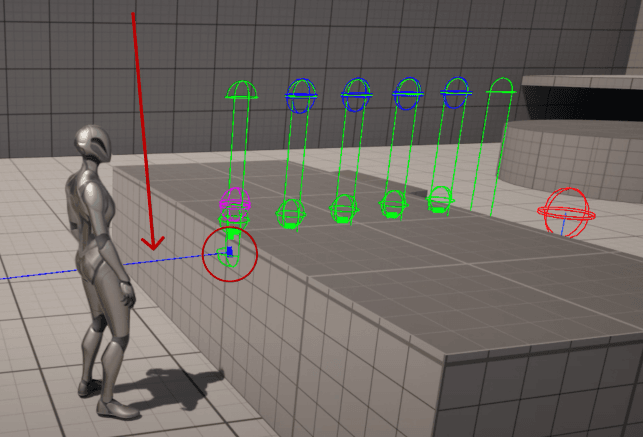
The system is designed to automatically detect any object with collision, whether it’s a Static Mesh or a Skeletal Mesh. This means your character can vault over virtually anything in the world, from walls and fences to moving creatures, as long as the object has collision enabled.
• Customization
-
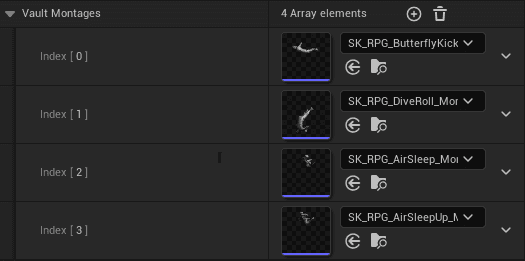
Create or import your custom animation.
-
Add Motion Warping Notifiers inside montage to align the player correctly with the obstacle.
-
Save the montage, it’s ready to be used in the Vaulting System.
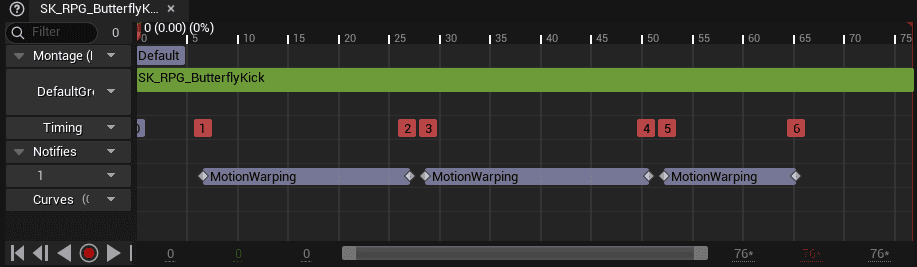
Just copy and align the Notifiers from the existing vaulting animations.
We have a dedicated video for this on YouTube!
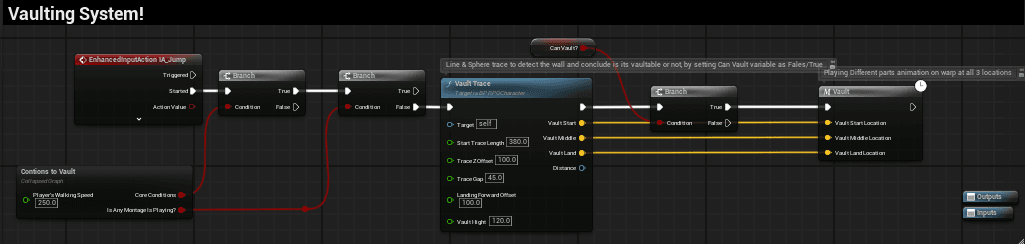
The Vault Trace function handles obstacle detection and alignment for the vaulting system. You can fine tune these values to match the feel of your game
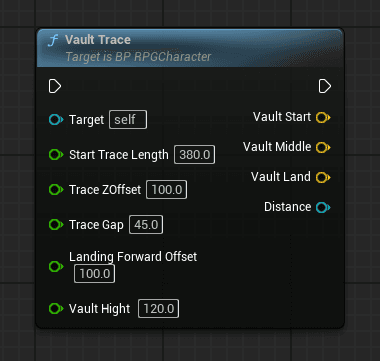
Start Trace Length
- Defines how far ahead the system checks for obstacles.
Trace Z Offset
- Controls the vertical height at which the trace starts.
Trace Gap
- Sets the spacing between multiple traces.
Landing Forward Offset
- Determines how far forward the player will land after vaulting.
Vault Height
- Defines the maximum obstacle height the player can vault over.
That's all for vaulting around!
Mantling System
The Mantling System in the URPG Template allows your character to climb over ledges, walls, and other obstacles seamlessly. It ensures smooth traversal across the environment, making gameplay feel more dynamic and natural.
Jumping System
The Jump System ensures that if the player cannot vault or mantle (when the trace does not detect a valid obstacle), the character will automatically perform a jump instead.