
Setup URPG
Step by step guide to set up the Ultimate RPG Template in Unreal Engine projects.
• Step 1 : Download the Ultimate RPG Template Plugin
After geting the Plugin from Fab extract the plugin using the Code that you will get after purchase.

• Step 2 : Adding the Plugin inside Project
Open your Project folder and inside the plugins folder past the URPG Plugin
If 'plugins folder' is not there then create one, past the URPG Template plugin inside it.
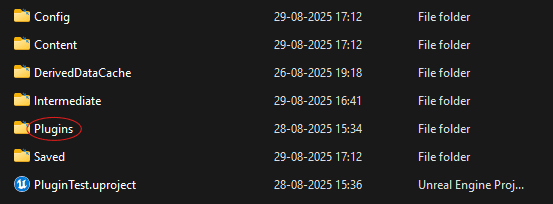
Project<Plugins<UltimateRPG

• Step 3 : Enabling the Plugin inside Project
Open project & under plugins tab enable the UltimateRPG Plugin.

You're Ready to Go!
🎉 Congratulations!
URPG is now integrated into your Unreal Engine project. You can start using it's Content and the modular system!
• What Next ?
- Explore the UltimateRPG in your project.
- Join our community for tips and support!
Ultimate RPG Template (Beta)
Fully Blueprint-based Unreal Engine framework designed to quickly build and customize your dream single player RPG.
Upcoming Features
The Ultimate RPG Template (URPG) is currently in Beta, which means it includes only a few core systems right now. However, regular updates are planned, and the template will soon grow into a complete RPG framework.